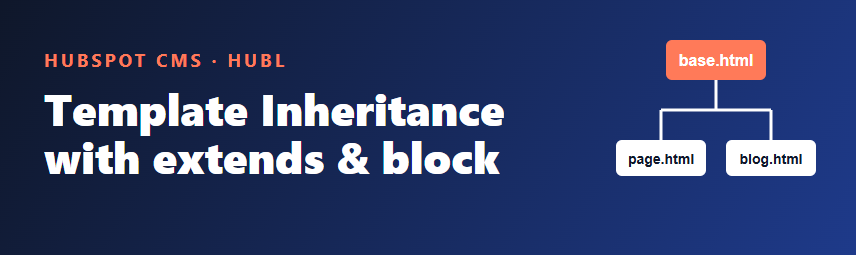
Every HubSpot theme eventually ends up with several templates (a landing page, a standard page, a blog post) that all repeat the same <head>, header and footer. Change the footer and you have to edit every file. HubL, HubSpot's templating language, solves this with template inheritance: one base layout defines the shared structure, and child templates fill in only the parts that differ.
The idea in one minute
Inheritance uses two tags from the Jinja family that HubL supports:
{% block name %}...{% endblock %}marks a named area in a layout that children may replace.{% extends "path/to/layout.html" %}tells a template which layout it builds on.
The base layout is written once. Each child template extends it and overrides only the blocks it cares about.
Step 1: Create a base layout
Put the shared markup in a layout file, for example templates/layouts/base.html. Keep HubSpot's required includes here so every child gets them automatically.
<!DOCTYPE html>
<html lang="{{ html_lang }}">
  <head>
    <meta charset="utf-8">
    <title>{{ content.html_title }}</title>
    {{ standard_header_includes }}
  </head>
  <body>
    {% block header %}
      {% module "site_header" path="../modules/site-header" %}
    {% endblock header %}

    <main>
      {% block body %}{% endblock body %}
    </main>

    {% block footer %}
      {% module "site_footer" path="../modules/site-footer" %}
    {% endblock footer %}

    {{ standard_footer_includes }}
  </body>
</html>
The header and footer blocks contain sensible defaults. The body block is empty because every page type fills it differently. Naming the block in {% endblock body %} is optional but makes long files easier to read.
Step 2: Extend it in a child template
A page template now only needs to declare its type, extend the layout and provide the body:
<!--
  templateType: page
  label: Standard page
-->
{% extends "./layouts/base.html" %}

{% block body %}
  {% dnd_area "main_area" %}
    {% dnd_section %}
      {% dnd_module path="@hubspot/rich_text" %}{% end_dnd_module %}
    {% end_dnd_section %}
  {% end_dnd_area %}
{% endblock body %}
Because the child does not mention header or footer, it inherits the defaults from the base file. Update the footer module once and every template that extends the layout changes with it.
Step 3: Override a default block
A landing page often should not show the site navigation. Redefine the block as empty:
{% extends "./layouts/base.html" %}

{% block header %}{% endblock header %}

{% block body %}
  {% dnd_area "landing_area" %}{% end_dnd_area %}
{% endblock body %}
Rules worth remembering
- Put
extendsat the top. Anything a child template places outside a block is not part of the final output, so keep your markup inside blocks. - Block names must match exactly. A block named
contentin the child has no effect if the layout definesbody. If a section does not appear, check the block name first. - Relative paths are resolved from the current file.
./layouts/base.htmlworks from the templates folder; use the path that matches your theme's folder layout. - Test in the preview. Open the page in the design manager preview or in a local environment after every change to the layout, because one edit affects all children.
extends or include?
Use extends when templates share a whole page skeleton and differ in a few regions. Use {% include %} when you want to drop a small partial (for example a tracking snippet) into one spot. They combine well: a base layout can include partials, and children extend the layout. For reusable logic with arguments, see macros instead.
A sensible starting structure
templates/layouts/base.htmlfor the shared skeleton and required includestemplates/page.html,templates/landing.htmlandtemplates/blog-post.htmlas thin childrenmodules/site-headerandmodules/site-footerfor the pieces that editors manage
Conclusion
Template inheritance keeps a HubSpot theme maintainable: one layout, a handful of named blocks, and children that stay short. Start by moving your repeated header and footer into a base file, then override blocks only where a template truly differs.
Sources
- HubSpot Developers: HubL standard tags (extends, block, include)
- HubSpot Developers: Templates and drag and drop areas for CMS themes