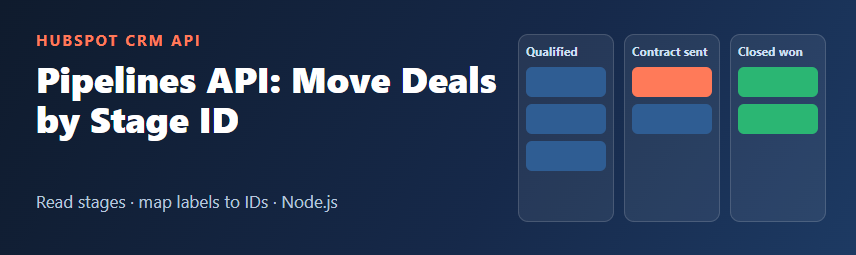
Sooner or later every HubSpot integration needs to move a deal: a payment arrives, so the deal should go to "Closed won"; a contract is signed in another tool, so the deal moves to "Contract sent". The first attempt usually fails with a confusing error, because HubSpot does not store the stage label you see on the board. It stores an internal stage ID.
This guide shows how to read pipelines and stages with the HubSpot Pipelines API, turn labels into IDs, and move deals between stages and pipelines safely from Node.js.
Labels vs. internal IDs
A deal has two properties that place it on a board:
pipeline: the internal ID of the pipeline the deal belongs to.dealstage: the internal ID of the stage inside that pipeline.
The labels ("Sales Pipeline", "Contract sent") can be renamed by anyone with the right permissions. The IDs do not change when a label is renamed. That is why your code should always send IDs and look them up, not hard-code labels.
In many accounts the original deal pipeline has the ID default and its built-in stages have readable IDs such as appointmentscheduled, contractsent, closedwon and closedlost. Pipelines and stages you create yourself get generated IDs (usually long numbers). Never assume: read them from the API.
List pipelines and their stages
The Pipelines API works for deals, tickets and other objects that support pipelines. The object type is part of the path:
GET https://api.hubapi.com/crm/v3/pipelines/deals
Authorization: Bearer YOUR_PRIVATE_APP_TOKEN
The response contains a results array. Each pipeline includes its stages, so one call is usually enough. A shortened example:
{
  "results": [
    {
      "id": "default",
      "label": "Sales Pipeline",
      "displayOrder": 0,
      "archived": false,
      "stages": [
        {
          "id": "contractsent",
          "label": "Contract sent",
          "displayOrder": 4,
          "archived": false,
          "metadata": { "isClosed": "false", "probability": "0.9" }
        },
        {
          "id": "closedwon",
          "label": "Closed won",
          "displayOrder": 5,
          "archived": false,
          "metadata": { "isClosed": "true", "probability": "1.0" }
        }
      ]
    }
  ]
}
Notice that metadata values such as probability and isClosed are strings, not numbers or booleans. Convert them before comparing.
Other useful endpoints:
GET /crm/v3/pipelines/deals/{pipelineId}: one pipeline with its stages.GET /crm/v3/pipelines/deals/{pipelineId}/stages: only the stages of one pipeline.- Replace
dealswithticketsto work with help desk pipelines.
Scopes for a private app
Use a private app token and keep it on the server. To read deals and their pipelines, give the app crm.objects.deals.read; to update deals, add crm.objects.deals.write. Creating or editing pipelines themselves needs additional permissions, so check the scopes listed in the Pipelines API reference for your object before you build that part.
Build a label-to-ID map in Node.js
This example uses the built-in fetch in Node.js 18 or later. It loads all deal pipelines once and builds a lookup you can reuse:
const TOKEN = process.env.HUBSPOT_TOKEN;
const API = 'https://api.hubapi.com';

async function hubspot(path, options = {}) {
  const res = await fetch(API + path, {
    ...options,
    headers: {
      Authorization: `Bearer ${TOKEN}`,
      'Content-Type': 'application/json',
      ...options.headers
    }
  });
  const body = await res.json().catch(() => ({}));
  if (!res.ok) {
    throw new Error(`HubSpot ${res.status}: ${body.message || 'request failed'}`);
  }
  return body;
}

async function loadDealPipelines() {
  const { results } = await hubspot('/crm/v3/pipelines/deals');
  const byLabel = new Map();

  for (const pipeline of results) {
    if (pipeline.archived) continue;
    const stages = new Map();
    for (const stage of pipeline.stages) {
      if (stage.archived) continue;
      stages.set(stage.label.trim().toLowerCase(), {
        id: stage.id,
        isClosed: stage.metadata?.isClosed === 'true',
        probability: Number(stage.metadata?.probability ?? 0)
      });
    }
    byLabel.set(pipeline.label.trim().toLowerCase(), { id: pipeline.id, stages });
  }
  return byLabel;
}

function findStage(pipelines, pipelineLabel, stageLabel) {
  const pipeline = pipelines.get(pipelineLabel.trim().toLowerCase());
  if (!pipeline) throw new Error(`Unknown pipeline: ${pipelineLabel}`);
  const stage = pipeline.stages.get(stageLabel.trim().toLowerCase());
  if (!stage) throw new Error(`Unknown stage "${stageLabel}" in ${pipelineLabel}`);
  return { pipelineId: pipeline.id, stageId: stage.id };
}
Matching by label is handy for configuration files and admin screens, but labels can change. For long-running integrations, store the IDs in your configuration and use labels only to find them the first time.
Move a deal to another stage
Moving a deal is a normal property update on the deal record:
PATCH https://api.hubapi.com/crm/v3/objects/deals/{dealId}
Content-Type: application/json

{
  "properties": {
    "dealstage": "closedwon"
  }
}
In Node.js, using the helpers above:
async function moveDeal(dealId, pipelineLabel, stageLabel) {
  const pipelines = await loadDealPipelines();
  const { pipelineId, stageId } = findStage(pipelines, pipelineLabel, stageLabel);

  return hubspot(`/crm/v3/objects/deals/${dealId}`, {
    method: 'PATCH',
    body: JSON.stringify({
      properties: { pipeline: pipelineId, dealstage: stageId }
    })
  });
}

// Example: a payment webhook marks the deal as won
await moveDeal('1234567890', 'Sales Pipeline', 'Closed won');
Sending pipeline together with dealstage is a good habit. The stage must belong to the deal's pipeline; if you only send a stage ID from a different pipeline, HubSpot rejects the update with a validation error.
Move a deal to a different pipeline
To move a deal from, say, a "New business" pipeline to a "Renewals" pipeline, update both properties in the same request, with a stage ID that exists in the new pipeline:
{
  "properties": {
    "pipeline": "RENEWALS_PIPELINE_ID",
    "dealstage": "FIRST_STAGE_ID_IN_RENEWALS"
  }
}
Look up both IDs with GET /crm/v3/pipelines/deals first. Do not copy stage IDs between pipelines: two stages with the same label in different pipelines have different IDs.
Create a deal directly in the right stage
The same two properties work when you create a deal:
POST https://api.hubapi.com/crm/v3/objects/deals

{
  "properties": {
    "dealname": "Website redesign - Example Corp",
    "amount": "4500",
    "pipeline": "default",
    "dealstage": "appointmentscheduled"
  }
}
If you create deals from a form or a sync, decide the starting stage in one place in your code, so every new deal lands where your sales team expects it.
Find deals in a stage
To list all deals in one stage, use the CRM search API with the stage ID, not the label:
POST https://api.hubapi.com/crm/v3/objects/deals/search

{
  "filterGroups": [
    { "filters": [ { "propertyName": "dealstage", "operator": "EQ", "value": "contractsent" } ] }
  ],
  "properties": ["dealname", "amount", "pipeline", "dealstage"],
  "limit": 100
}
Ticket pipelines work the same way
For tickets, call GET /crm/v3/pipelines/tickets, and update the ticket's hs_pipeline and hs_pipeline_stage properties instead of pipeline and dealstage. Ticket stages carry a ticketState value in their metadata (OPEN or CLOSED) instead of a deal probability.
Creating pipelines with the API: be careful
You can also create pipelines with POST /crm/v3/pipelines/deals, sending a label, a displayOrder and a stages array. Deal stages need a probability in their metadata, a string between "0.0" and "1.0". In most projects, though, pipelines are business decisions owned by the sales or support team. Let them build pipelines in HubSpot settings, and let your code read them. Before deleting or archiving a pipeline or stage, move its records somewhere else first, and remember that the number of pipelines you can have depends on your HubSpot subscription.
Cache pipelines, but not forever
Pipelines change rarely, so there is no need to fetch them before every deal update. A simple in-memory cache with a short lifetime works well:
let cache = null;
let cachedAt = 0;
const TTL_MS = 10 * 60 * 1000; // 10 minutes

async function getPipelines({ refresh = false } = {}) {
  if (refresh || !cache || Date.now() - cachedAt > TTL_MS) {
    cache = await loadDealPipelines();
    cachedAt = Date.now();
  }
  return cache;
}
Then call getPipelines() in moveDeal instead of loadDealPipelines(). If findStage throws "Unknown stage", call getPipelines({ refresh: true }) and try once more: someone may have just renamed or added a stage. Large syncs should also handle 429 responses; see our guide on handling HubSpot API rate limits in Node.js.
Common errors
- 400 with an invalid option or stage message: you sent a label instead of an ID, or a stage that does not belong to the deal's pipeline.
- 403: the private app is missing a scope, for example
crm.objects.deals.write. - 404: the pipeline ID or the deal ID does not exist in this account. IDs differ between your production account and a sandbox or test account.
- Deal moved, but automation did not run as expected: stage changes made through the API can trigger workflows and update stage-related dates just like changes in the UI. Test in a sandbox before you move many deals at once.
Checklist
- Read pipelines and stages from
/crm/v3/pipelines/{objectType}; never hard-code labels. - Store pipeline and stage IDs in configuration, per HubSpot account.
- Send
pipelineanddealstagetogether (orhs_pipelineandhs_pipeline_stagefor tickets). - Skip archived pipelines and stages, and convert metadata strings before comparing.
- Cache pipelines for a few minutes and refresh on "unknown stage" errors.
- Keep the token on the server and give the private app only the scopes it needs.
Once your code speaks in stage IDs instead of labels, renaming a stage on the board no longer breaks your integration, and every automated deal update lands exactly where your team expects it.