Laravel queues are one of the most powerful tools available for handling background jobs.
From sending emails and processing imports to synchronizing third-party APIs, queues help keep applications responsive while moving heavy workloads into the background.
However, production systems are rarely perfect.
Even with proper monitoring, we've encountered situations where queue workers stopped processing jobs because of:
Database connectivity issues
Unexpected memory spikes
Server restarts
Third-party API failures
Supervisor process crashes
Deployment-related issues
Rather than waiting for users or clients to report problems, we wanted a way to automatically recover from these situations.
This article explains the approach we've implemented using Supervisor, Bash scripts, and email notifications.
The Problem
Under normal conditions, Supervisor automatically restarts Laravel queue workers when they exit unexpectedly.
A typical Supervisor configuration looks like this:
[program:laravel-worker]
process_name=%(program_name)s_%(process_num)02d
command=php artisan queue:work
autostart=true
autorestart=true
numprocs=1
This setup works well most of the time.
However, we discovered that certain failures occurred outside the worker process itself.
Examples included:
Supervisor service becoming unavailable
Multiple workers entering a failed state
Deployment updates requiring queue restarts
Long-running processes becoming unstable
In these cases, automatic worker restart was not always enough.
Our Goal
We wanted a system that could:
Verify Supervisor is running
Verify queue workers are healthy
Restart services when needed
Clear Laravel caches
Restart queue workers safely
Send notifications when failures occur
Most importantly, we wanted a solution that required minimal manual intervention.
The Monitoring Script
We created a lightweight Bash script that runs on a schedule.
The process is straightforward:
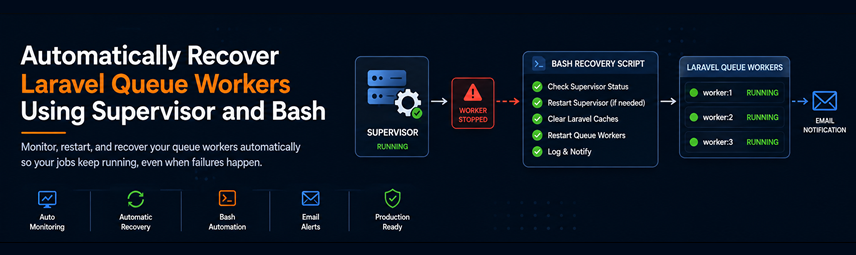
Check Supervisor status
Restart Supervisor if needed
Clear Laravel caches
Restart queue workers
Capture error information
Send an email notification
The basic check looks something like:
systemctl is-active supervisor
If the response is not active, recovery procedures begin automatically.
Restarting Supervisor
When Supervisor is unavailable, the first recovery step is:
systemctl restart supervisor
After a short delay, the script verifies that the service is healthy again.
If recovery succeeds, Laravel maintenance commands are executed.
Refreshing Laravel Workers
Whenever queue-related failures occur, we prefer performing a clean worker restart.
Laravel provides:
php artisan queue:restart
This allows existing workers to finish their current jobs before restarting gracefully.
We also clear application caches to eliminate potential stale configurations.
php artisan optimize:clear
These two commands solve a surprising number of deployment-related issues.
Capturing Useful Diagnostic Information
Restarting services is helpful, but understanding why they failed is equally important.
Before recovery actions occur, we collect information from:
Supervisor logs
Laravel logs
System logs
Recent error messages
For example:
tail -100 storage/logs/laravel.log
Capturing recent failures allows us to investigate root causes without needing to reproduce the issue later.
Email Notifications
A recovery system should never operate silently.
If a failure occurs, the responsible team should know.
Our script sends an email containing:
Timestamp
Server hostname
Recovery actions performed
Recent log entries
Recovery result
This provides immediate visibility while reducing the need for constant monitoring.
Typical notifications include:
Supervisor stopped unexpectedly.
Recovery executed successfully.
Queue workers restarted.
or
Recovery failed.
Manual intervention required.
Scheduling the Health Check
The monitoring script runs automatically through Cron.
Example:
*/5 * * * * /opt/scripts/check-supervisor.sh
This checks the system every five minutes.
For most applications, this provides a good balance between responsiveness and resource usage.
Mission-critical systems may require more frequent checks.
Benefits We've Seen
Since implementing automated recovery, we've noticed several improvements.
Reduced Downtime
Many issues are resolved within minutes without human involvement.
Faster Incident Response
When manual intervention is required, notifications arrive immediately.
Improved Reliability
Queue processing remains available even after unexpected failures.
Better Visibility
Logs and notifications provide valuable troubleshooting information.
Things This Doesn't Replace
Automated recovery is not a substitute for fixing root causes.
If workers continually crash because of:
Memory leaks
Poorly written jobs
Database problems
Infrastructure issues
Those underlying problems still need attention.
Recovery scripts simply reduce the impact while investigations are underway.
Final Thoughts
Laravel queues are incredibly reliable, but every production environment eventually experiences failures.
By combining:
Supervisor
Bash automation
Laravel maintenance commands
Email notifications
Scheduled health checks
we created a lightweight recovery system that significantly reduces downtime and operational overhead.
The goal isn't to eliminate every failure.
The goal is to recover quickly, notify the right people, and keep the application running while deeper issues are investigated.
For teams running production Laravel applications, even a simple automated recovery script can save hours of troubleshooting and help maintain a much more resilient queue infrastructure.